Currently, I am studying ARM. This is my first ARM Reverse writeup. To download the resource, we can go to Worrydonot CrackMe.
This is for beginners and serves as my personal notes. Feel free to comment if I am wrong or if you think it could be improved.
Let’s start!
To start the reversing, I ask myself, what does the program do?


So, our target is to input the correct password.
Find Interesting Strings
Strings reveal what a program does. How to do it in Ghidra?
- Window → Defined Strings
- Sort by “String” column or scroll through the list
We will find:
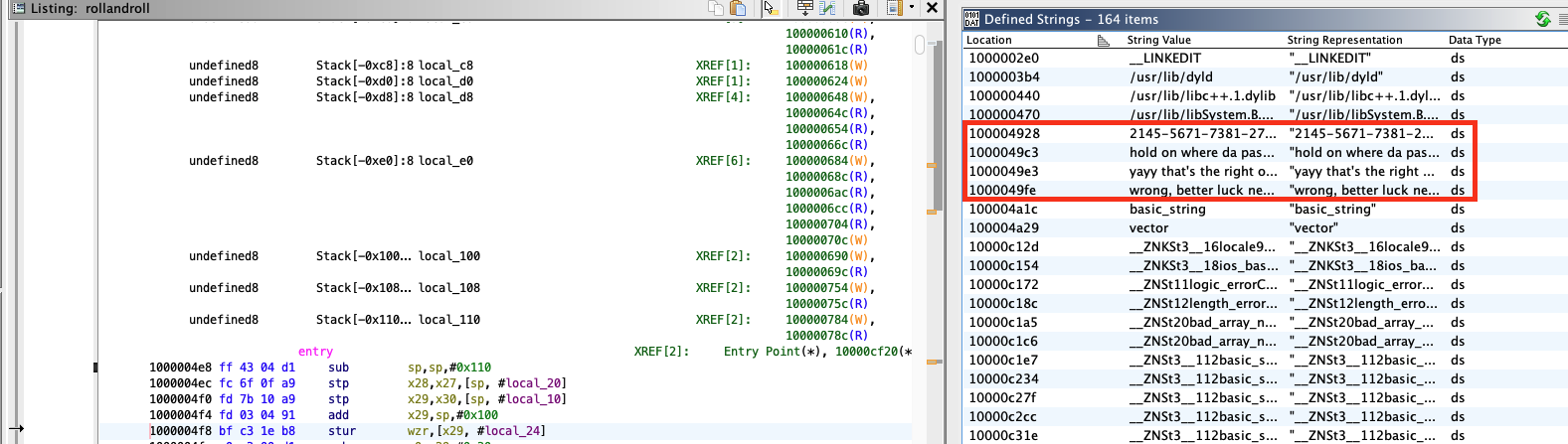
What do we observe?
- “hold on where da password at?: “ → This is prompting for input
- “wrong, better luck next time.” → This is the failure message
- “yayy that’s the right one!” → This is the success message
Find where the strings are used (x-refs)
Now, I tried to find which function uses these strings. This leads us to the main logic.
How to find x-refs?
-
Click on the string in the Defined Strings Window
-
Right-click -> “References” -> “Show References To …”
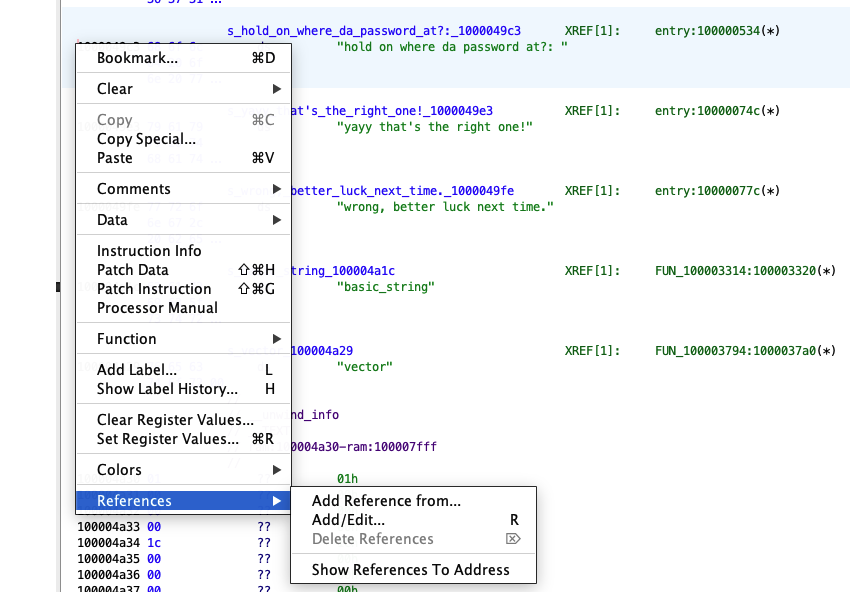
- Ghidra will show all places that reference this string
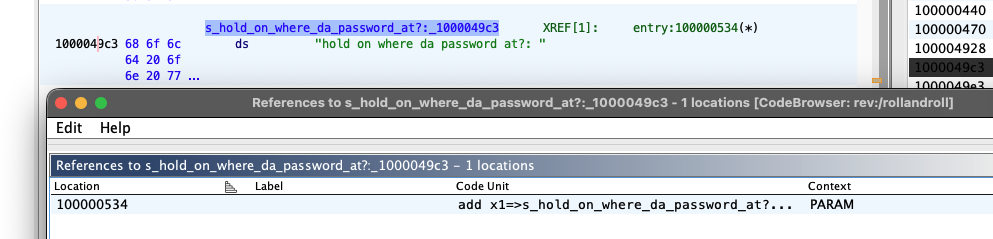
- The prompt string “hold on where da password at?: “ is referenced at address 100000530
- Then, we see the success/failure messages are referenced around 100000748 and 100000778

All of them are in the same function: entry.
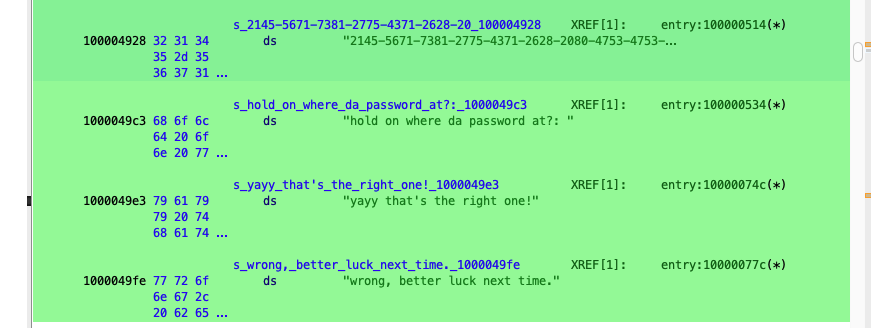
(Note: In standard C/C++ programs, the main logic is usually in the main function. Here, Ghidra shows it in entry, which is typically the _start point of an ELF binary, but for this CrackMe, it contains the core logic).
Back to entry
- Click on entry in the Symbol Tree (left panel → Functions)
- Or press G, type 1000004e8, press Enter
- The Decompiler window (right side) will show the C code
from top to bottom:
First section: Setup
FUN_100000808(auStack_40);                            // Constructor
FUN_100000834(auStack_58);                            // Constructor
FUN_100000860(auStack_70, "2145-5671-...");           // String assignment!
FUN_100000808(auStack_98);                            // Constructor
What to notice:
- FUN_100000860 gets the long number string as argument → This is the target password.
- The first argument (auStack_70) is a local variable → This stores the target.
Second section: User I/O
FUN_100000894(PTR___ZNSt3__14coutE_100008080,"hold on where da password at?: ");
FUN_1000008dc(PTR___ZNSt3__13cinE_100008078,auStack_40);
What to notice:
- PTR__ZNSt3__14coutE… = std::cout (standard output)
- PTR__ZNSt3__13cinE… = std::cin (standard input)
- The _ZNSt3… is C++ Name Mangling for standard library functions.
- auStack_40 receives the user input → This is your password.
Third section: First Loop
while (...) {
    ...
    local_b2 = local_b1 ^ 0xf;                        // ← XOR with 0x0F!
    ...
    FUN_100000b40(auStack_58, &local_b8);             // Push to some container
}
What to notice:
- ^ 0xf = XOR with 15 → First transformation.
- The result goes into auStack_58 (a vector/array).
Fourth section: Second Loop
while (...) {
    local_d8 = (int *)FUN_100000c3c(&local_c8);
    *local_d8 = (*local_d8 * (*local_d8 + 1)) / 2;    // ← Triangular formula!
    ...
}
What to notice:
- n * (n + 1) / 2 → Triangular number formula → Second transformation.
Fifth section: Building Result
string_push_back(auStack_98, 0x2d);                   // Append '-'
__ZNSt3__19to_stringEi(auStack_f8, *puVar5);          // Convert int to string
string_append(auStack_98, auStack_f8);                // Append to result
What to notice:
- 0x2d = ‘-‘ in ASCII → Dashes between numbers.
- to_string → Converting numbers to text.
- Building the dash-separated string.
Sixth section: The Check!
uVar2 = std_string_equal(uVar2 - uVar4, auStack_98, auStack_70);  // ← COMPARE!
if ((uVar2 & 1) == 0) {
    // "wrong, better luck next time."
} else {
    // "yayy that's the right one!"
}
What to notice:
- std_string_equal compares auStack_98 (computed from input) with auStack_70 (hardcoded target).
- This is the password check.
Data Flow
In Ghidra, trace where data flows:
auStack_40 (user input) → XOR 0x0F → auStack_58 (vector) → n*(n+1)/2 → auStack_58 (modified) → to_string + join with - → auStack_98 (result string) → compare with auStack_70 (target string)
Extract the Target String
You can copy the target string directly from Ghidra:
In the Listing window (middle), find the address 100004928. You’ll see the bytes and the string. Or in the Decompiler, double-click the string literal.
Copy it out (be careful to remove any accidental spaces caused by line wraps when copying!):
2145-5671-7381-2775-4371-2628-2080-4753-4753-6105-4371-4095-4753-6105-4371-2080-7503-4753-2850-3081-4753-2850-5778-5671-7750-5671-4371-4186-7021-2080-4095
Solve
To reverse the transformations, we just need to do it backward:
- Solve the Triangular number formula to get back the XORed character.
- XOR it with 0x0F again. (XOR is reversible: A ^ B ^ B = A)
import math

# The clean string from Ghidra
target = "2145-5671-7381-2775-4371-2628-2080-4753-4753-6105-4371-4095-4753-6105-4371-2080-7503-4753-2850-3081-4753-2850-5778-5671-7750-5671-4371-4186-7021-2080-4095"

numbers = [int(x) for x in target.split("-")]

password = ""
for T in numbers:
    # Reverse Triangular Number: T = n * (n + 1) / 2
    # => n^2 + n - 2T = 0
    # Using quadratic formula: n = (-1 + sqrt(1 - 4(1)(-2T))) / 2
    # => n = (-1 + sqrt(1 + 8T)) / 2
    n = int((-1 + math.sqrt(1 + 8 * T)) / 2)

    # Reverse XOR: n ^ 0x0F
    char = chr(n ^ 0x0F)
    password += char

print(password)
